Suno - AI Music & Songs Maker
- 4.8
- Rating
- 10.00M
- Installs
- Free
- Price

 Analysis by App-foxy
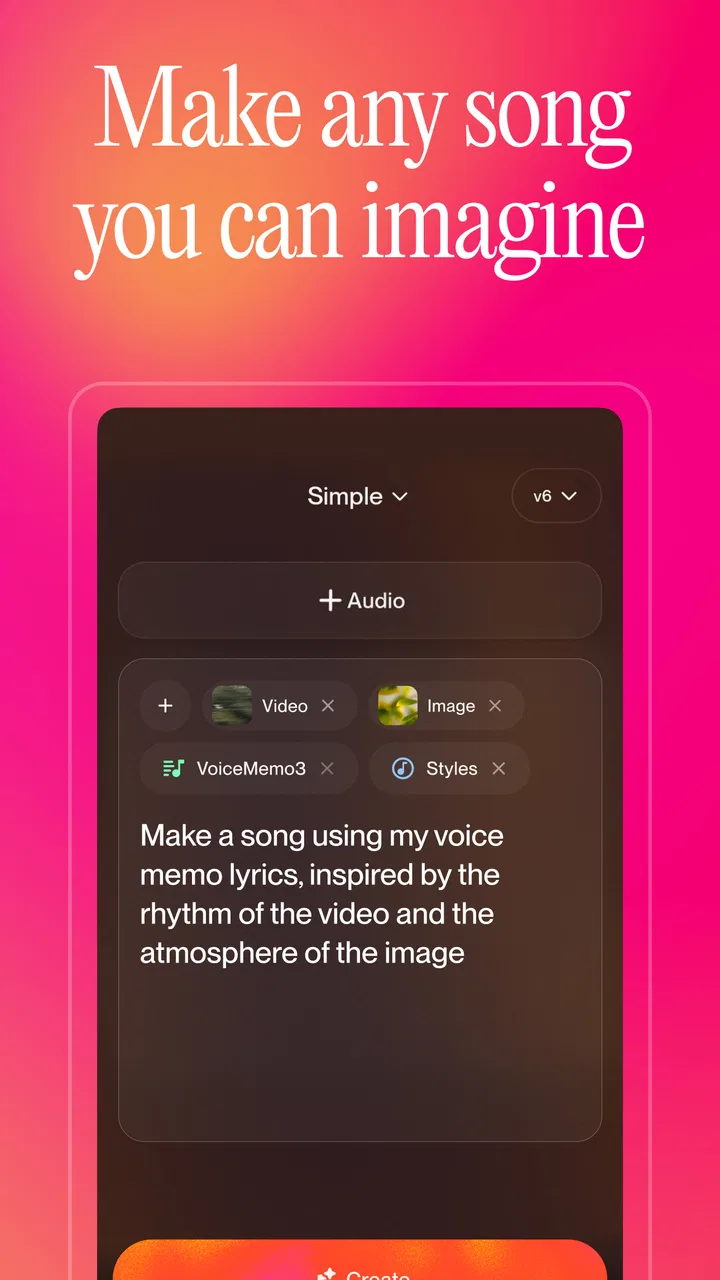
I opened Suno, Inc’s music and audio app with a simple goal: turn a rough song idea into something I could actually listen to. That starting point matters, because this is not mainly a traditional recording studio in your pocket. It is better understood as a fast sketching partner for people who have a lyric fragment, a mood, a story, or even just a strange combination of genres and want to hear where it could go.
Suno is free to install and aimed at Teen users, with optional in-app purchases ranging from $4.00 to $289.99 per item. The app has reached over 10 million installs and holds a 4.8 average from around 945 thousand ratings, which gives a useful sense of how widely it has been adopted. I still think the large audience can create unrealistic expectations: popularity does not turn every generated track into a finished release.
From a half-formed idea to a listenable song
I find the most useful way to approach a first generation is to treat it as a test of the idea, not a verdict on my songwriting. A short, vivid brief gives me something specific to assess, and listening for one detail at a time helps me decide what to adjust next. That makes the next question less about inspiration and more about how to spend effort when I use Suno heavily.
You May Also Like

 Blood Strike: 2.5 Anniversary
Blood Strike’s Loadouts Turn Every Drop Into a Tactical Gamble
A close look at Blood Strike’s custom loadouts: how fast access to signature weapons reshapes its battle royale rhythm, rewards preparation, and narrows the gap between fights.

 Pandora - Music & Podcasts
Pandora’s Music Is Easy to Start, but Harder to Recover
Pandora’s strength is its low-effort path from a seed to a station. Its weak spot is how much confidence it asks you to place in connection, setup, and quiet recovery.

 8 Ball Pool
 Is Built on Rivalries, Rematches, and Routine
A close look at the rivalries, rematches, shared routines, and unanswered safety questions that turn a quick pool match into a persistent mobile community.

 Samsung Music
’s Quiet Strength Is Playing What You Already Own
Its reach comes less from spectacle than from dependable access to a personal library. That simplicity is both the app’s strongest retention engine and its ceiling.

 AccuWeather: Weather Radar
AccuWeather Review: A Quick, Clear Forecast for Everyday Decisions
For everyday plans, the best forecast is the one you can understand quickly. AccuWeather makes rain timing, radar, and local conditions easy to act on, with a few trade-offs.

 Hill Climb Racing
Why Hill Climb Racing Still Turns Crashes Into One More Run
A tiny car, a bumpy hill and one more upgrade: Hill Climb Racing keeps resurfacing because its simple chaos makes every near-miss feel personal.
More From Our News Desk
View All News


The best starting point is a clear creative brief
My first useful lesson was not to begin with a vague request such as “make a good song.” Suno responds more effectively when I decide what I want the listener to feel, what kind of voice or energy fits, and whether the song should be compact, dramatic, playful, or restrained. I do not need formal music theory, but I do need a direction.
A practical starting brief might be: a warm, reflective song about leaving a familiar town, with a memorable chorus and a gentle build. That gives the generator more to work with than a pile of disconnected genre labels. I also find it helpful to separate the emotional idea from the surface style. “Hopeful but slightly homesick” is more useful to me than simply stacking “pop, rock, acoustic, cinematic.”
This is where the app feels different from a normal digital audio workstation. In a conventional tool, I would choose instruments, record or program parts, edit timing, balance tracks, and gradually assemble an arrangement. Suno moves the first stage much closer to conversation. That makes it inviting for non-musicians, while also making the quality of the initial instruction unusually important.
Writing lyrics is a separate decision
When I already have lyrics, I prefer to treat them as the backbone rather than letting the app decide everything. I can prepare a verse, a chorus, and perhaps a short bridge before generating. That approach gives me more ownership over the story and makes it easier to compare different musical treatments of the same words.
When I have no lyrics, the app is more useful as an idea generator. It can help me discover a hook or a surprising phrase, but I would not automatically accept the first wording. Generated lyrics can sound smooth while still being too general, overly tidy, or emotionally less specific than the original idea. My advice is to use the first result as a draft, then listen for lines that feel interchangeable with any other song.
A non-obvious advantage is that I can use the same concept as a small creative test. I might ask for a quiet version first, then a more energetic interpretation, and compare which arrangement reveals the strongest chorus. This is not only about producing a final track; it is a way to find out what the idea actually is.
Generation is the beginning of the review process, not the end
The first listen should be diagnostic. I pay attention to whether the vocal phrasing supports the words, whether the chorus arrives with enough contrast, and whether the ending feels intentional. A track can sound impressive during its opening seconds and still lose focus later. I also listen for awkward pronunciation, crowded syllables, abrupt transitions, and instrumental choices that fight the mood.
That habit prevents a common mistake: judging the app only by the most exciting few seconds. Suno can produce a convincing atmosphere quickly, but a complete song has to survive repeated listening. I would rather keep a modest, coherent result than a spectacular opening attached to a weak second half.
Use variations as comparisons, not as an endless slot machine
One of my more useful workflows is to decide what I am testing before generating another version. Am I checking the vocal character, the pace, the chorus, or the overall genre? If I change everything at once, I cannot tell why one result works better. If I change one creative variable, the comparison becomes much clearer.
This also helps with the practical cost of experimentation. The app is free to start, but the presence of optional purchases means I would not treat generation as limitless. I work from a short brief, keep the strongest idea, and avoid producing dozens of near-identical attempts just because the process is entertaining.
The handoff from idea to usable audio
The most important handoff happens when I stop thinking like a prompt writer and start thinking like an editor. Suno can give me a musical interpretation, but I still have to decide whether it serves the purpose. For a personal joke, a birthday surprise, or a mood-based playlist track, a rougher result may be perfectly successful. For a public release, a client project, or a serious recording, I would want much tighter control and a separate production stage.
That distinction answers a question many new users have: can this replace a musician or a full production setup? In my experience, it can replace some early-stage friction, especially when the alternative is an empty project and no idea how to begin. It does not replace the judgement involved in writing, arranging, editing, performing, mixing, or checking whether a finished piece truly sounds like your own work.
A realistic everyday scenario
Imagine I am preparing a short video for a family trip. I have a few lines about missed trains, rainy streets, and laughing at the wrong turn, but no instrumental track. I can shape those lines into a compact lyric, describe a bright travel-song mood, and generate a musical draft. After listening, I might discover that a slower acoustic treatment fits the memories better than the upbeat version I first imagined.
The useful outcome is not necessarily a perfect soundtrack. It may be a private song to share with friends, a rough guide for a human musician, or a clearer understanding of the emotional tone I want in the video. The handoff is simple: Suno supplies the first musical form, and I decide whether that form belongs in the final project or only in the idea folder.
Where it compares well with familiar alternatives
Compared with streaming services, Suno is not primarily about finding an existing artist or album. Its value is participation: I bring the starting idea and receive a new interpretation. That makes it more engaging when I want something tailored to a moment, but less useful when I simply want dependable background music from established performers.
Compared with a conventional recording app, it removes much of the technical setup. I do not have to begin by choosing a microphone, building a drum pattern, or learning a timeline-based editing system. That is a major advantage for a beginner. The trade-off is control. A traditional production tool lets me make precise choices about every part, while Suno is more like directing a capable but unpredictable collaborator.
Compared with a lyric-writing or note-taking app, it provides immediate musical feedback. A line that looks strong on a screen may feel clumsy when sung, and hearing it can reveal that quickly. On the other hand, a plain writing tool is better when I want to revise language without the distraction of a new arrangement every time.
The app works best when I give it a job
I would recommend defining the intended use before generating. A private demo, a social post, a birthday message, a songwriting prompt, and a commercial-quality release all require different standards. Suno is especially good at the first four because speed and surprise matter more than microscopic control.
For a songwriter, it can break a creative block by showing a possible melody or structure. For someone who cannot play an instrument, it can make an abstract idea audible. For a teacher or student, it can turn a topic into a memorable musical exercise. For a casual listener, it can be a playful way to explore combinations that would never appear in a normal playlist.
I would skip it if the main requirement is exact performance control, clean isolated parts, a consistent singer across every version, or a carefully repeatable arrangement. I would also skip it if I dislike the idea of revising generated material. The app rewards curiosity and selection; it is less satisfying for someone who wants to specify every note before hearing the result.
Friction that appears after the novelty fades
The biggest limitation is inconsistency. A compelling idea can produce a result with a weak vocal line, an awkward lyric, or an arrangement that does not develop naturally. Sometimes the musical surface is polished enough to distract me from the fact that the song has little identity. I have to be willing to reject attractive but forgettable results.
Another point of friction is the gap between generation and finishing. Even when the output feels complete, I may still want to trim an ending, replace a line, adjust the balance, or create a more deliberate version for a particular setting. Suno is excellent at shortening the distance between imagination and a first listen, but it does not remove the need for human editing decisions.
The credit and purchase structure also deserves attention. Since the app is free but offers individual purchases from $4.00 up to $289.99, I would check the current in-app choices before committing to a heavy experimentation habit. A casual user can enjoy the free entry point, while a frequent creator should think about how many attempts are genuinely useful rather than assuming every generation has equal value.
Privacy, originality, and sharing deserve a pause
Before sharing a song publicly, I would listen again with a different question: does this result express my idea, or does it merely sound plausible? I would also keep my own lyrics and drafts organized outside the app so that the creative history does not disappear into a stream of generated versions.
Originality is not only about whether a track sounds new. It is also about whether the words, concept, and final choices reflect something personal. The more specific my starting material is, the more meaningful the result tends to feel. A generic prompt may produce a pleasant song, but a detailed memory, unusual image, or clear narrative gives me something I can actually evaluate.
Device expectations and the current release
The app supports devices running Android 8.0 or later, so it is available to a broad range of Android users. Suno, Inc released it on December 3, 2024, and the current version is 1.41.0. I would still keep the app updated, particularly for a generation-heavy workflow where stability and account continuity matter more than they do in a simple offline player.
Its Teen content rating is also worth considering in a shared household. That does not tell me how every generated result will feel in practice, so I would use ordinary judgement when creating songs for children, classrooms, or public spaces. The app is flexible enough to follow very different moods, and that flexibility is part of both its appeal and its responsibility.
My practical method for getting better results
I begin with one emotional purpose and one listener. A song for myself can be more experimental than a song intended for a friend.
I write a short scene or story before adding style language. Concrete details usually give the result more character than a long list of genres.
I decide whether I want to supply the lyrics or use the generation as a writing prompt. Mixing those goals without a plan makes it harder to judge the outcome.
I compare versions by one feature at a time, such as chorus energy or vocal mood. This makes experimentation more efficient and teaches me what the prompt is actually changing.
I save the strongest concept, not merely the loudest or most polished clip. A quieter track with a clear identity is often more useful later.
Who should try it, and who should wait
I think Suno is a strong choice for curious beginners, lyricists, video makers, hobbyists, and anyone who wants to hear an idea before investing in a full production. Its free entry point lowers the barrier, and the large user base suggests that the concept has connected with many people. The 4.8 average is encouraging, though my own recommendation is based more on the workflow than on the rating.
I would point a serious producer toward it as a sketching companion rather than a complete studio replacement. It can help test direction, mood, and arrangement ideas, but a producer who needs exact edits may become frustrated by the distance between intention and result. Likewise, a listener who only wants a reliable catalog of familiar music should use a streaming service instead.
My final view after following the whole workflow
Suno succeeds because it makes the first musical moment arrive quickly. I can begin with a sentence, a lyric, or a feeling and reach a playable song idea without knowing how to arrange every instrument. That is genuinely empowering, especially when the alternative is leaving the idea unfinished.
Its weakness is closely connected to that strength. Because the app makes creation easy, it also makes it easy to generate too much and judge too little. The best results come when I act as a director and editor: I bring a specific starting point, compare variations thoughtfully, and keep only what has a reason to exist.
My recommendation is simple: try Suno if you want a fast, surprising route from imagination to musical draft, but do not confuse speed with completion. It is free to begin, available for Android 8.0 and newer, and developed by Suno, Inc, yet the real value appears only after the first generation, when I decide what to change, what to discard, and what deserves to be heard again.
FAQs for Suno - AI Music & Songs Maker
01What features does Suno - AI Music & Songs offer?
Suno - AI Music & Songs offers a range of features that allow users to create music with the help of AI technology. Users can generate unique tracks, experiment with different genres, and even customize elements like tempo and instrumentation. The app also provides tools for sharing creations with friends or on social media platforms.
02Is Suno - AI Music & Songs suitable for beginners in music creation?
Yes, Suno - AI Music & Songs is designed to be user-friendly, making it accessible for beginners. The intuitive interface guides users through the music creation process step-by-step, allowing anyone to start making music without prior experience. The app also includes tutorials and tips to help new users get started.
03Does Suno - AI Music & Songs require an internet connection to function?
While some features of Suno - AI Music & Songs can be used offline, an internet connection is required for accessing the full suite of AI-powered tools and for sharing music online. For the best experience, it's recommended to have a stable internet connection when using the app to utilize all its features fully.
04Are there in-app purchases or subscription fees in Suno - AI Music & Songs?
Suno - AI Music & Songs offers a free version with basic features, but there are in-app purchases and subscription options available for users who want to access premium features. These may include additional sound packs, advanced AI tools, and an ad-free experience. Pricing details can be found in the app store.
05How does Suno - AI Music & Songs handle user data and privacy?
Suno - AI Music & Songs prioritizes user privacy and complies with data protection regulations. The app collects minimal data necessary for functionality and user experience enhancement, such as usage statistics and preferences. Personal data is not shared with third parties without user consent. Users can review the privacy policy within the app for more details.
Pros
- Innovative AI-generated music options.
- Seamless user interface and experience.
- Regular updates with new features.
- Personalized playlists and recommendations.
- Supports offline listening and downloads.
Cons
- Limited free version features.
- Occasional app crashes reported.
- Requires internet for full functionality.
- Subscription model for premium access.
- Limited genre variety in AI music.

Suno - AI Music & Songs Maker
Gallery